
PazBy
Deafeny icon: a crescent moon beside three fading volume bars

Fall asleep to it. Wake up to silence.

Deafeny turns your media volume down a notch at a time while you drift off, then pauses whatever is playing and gets out of the way. A two-hour podcast or a five-hour live stream no longer wakes you at 3 a.m. at full volume.

Coming soon to Google Play · Free · No ads, no account, no internet permission

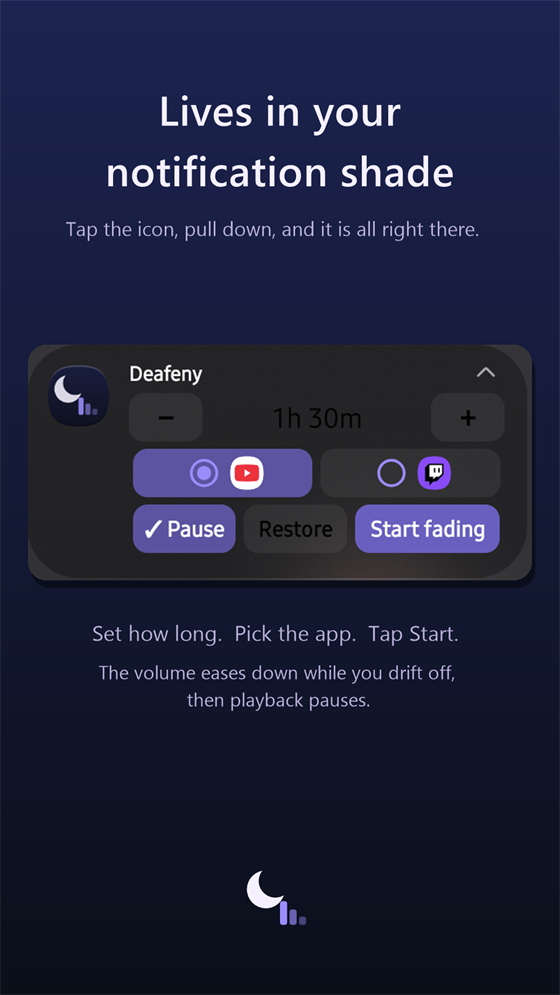
The Deafeny control panel inside the Android notification shade: fade length, YouTube or Twitch, Pause and Restore, Start fading

What is Deafeny?

Deafeny is a bedtime volume timer for Android. You fall asleep to something long and it keeps playing at full volume until it wakes you. Turning it off means screen on, unlock code, find the app, find pause — and by then you are awake. Deafeny lowers the media volume in a straight line over the time you choose, pauses playback when it reaches silence, and can put the volume back so the phone is not silent in the morning.

It is made by PazBy Software Ltd., the same small company behind PazBy, and it follows the same rules: no account, no ads, and nothing leaves your phone. Deafeny does not even have permission to use the internet.

How it works

1. Start your stream

Open YouTube or Twitch, start what you are listening to, and set the volume where you want the fade to begin.

2. Tap Deafeny

It does not open a screen. The logo shows for a second, and a small control panel appears in your notification shade.

3. Pull down, set, start

Choose how long — 15 minutes to two hours, starting at 30 — pick the app you are listening to, tap Start fading. You land straight back in your stream.

4. Put the phone down

The volume steps down every 30 seconds until it reaches silence, then playback is paused. If you are still awake, +15 min and Cancel are right there in the notification.

The Deafeny notification-shade panel

It lives in your notification shade

There is no app to keep open and nothing to find in the dark. Everything you use every night sits in one notification: the fade length with a − and + either side, the app you are listening to chosen by its icon, Pause and Restore toggles, and Start fading.

Even collapsed, the notification keeps the length steppers and Start fading on one row. While a fade runs, the same slot shows the countdown and the current volume, with +15 min and Cancel. When it ends, the panel comes back for tomorrow night.
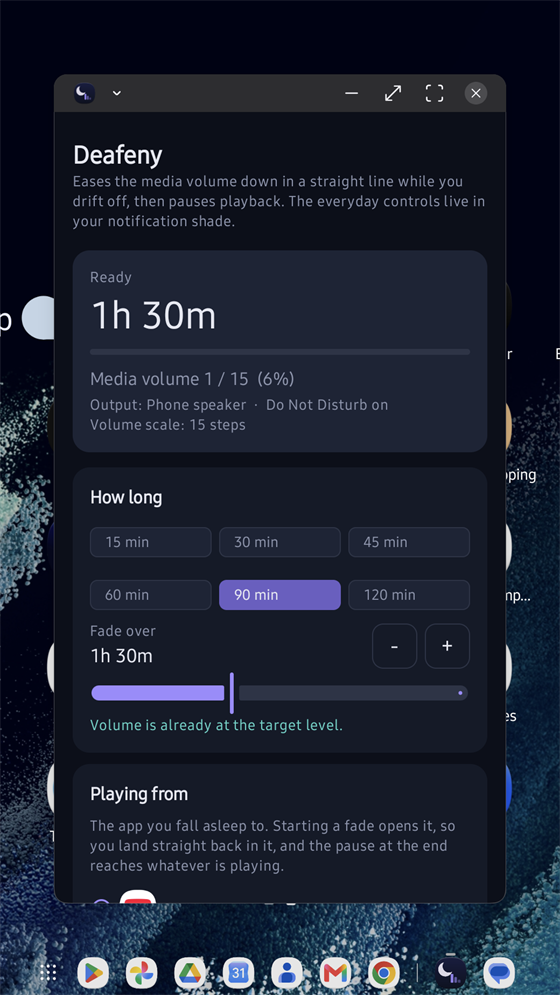
The Deafeny settings screen with the fade length, finish options and a live readout of the audio state

Finer controls when you want them

Tap the gear on the panel for the full settings: any length to the minute, a finish level above silence, whether a manual volume change mid-fade restarts the line from there, and whether the volume is put back afterwards.

The status card shows the current media volume, which output is in use — speaker, Bluetooth or wired — and the volume scale the device is reporting, so you can see exactly what a fade is going to do before you start it.

Built for bedtime

Runs with the screen off

The fade is a foreground service holding a wake lock, so it stays on schedule instead of being throttled by battery saving. A notification shows it running the whole time.

Follows manual changes

Turn the volume up mid-fade and the line restarts from that new level across the time remaining, instead of yanking it straight back down.

Pauses, then hands back

At the end it sends a pause to whatever holds the media session and checks that playback actually stopped before it will ever restore the volume. Your ringer and alarms are never touched; they use different audio streams.

Knows its surroundings

Shows whether you are on the speaker, a Bluetooth headset or wired headphones, copes with a headset connecting or dropping mid-fade, and explains the one Do Not Disturb setting that would stop it working, with a button straight to it.

Private by construction

No internet permission

Deafeny cannot send data anywhere. There are no analytics, no advertising and no crash-reporting libraries in it.

Nothing collected

Your settings stay in the app’s private storage on your phone so they are there the next night, and they disappear when you uninstall.

Three permissions, all visible

Notifications, because that is where the controls live. A foreground service and a wake lock, so the fade keeps time with the screen off. That is the whole list.

Read the Deafeny privacy policy →

Good to know

Volume steps are the device’s

Android exposes the media volume as a fixed number of steps, commonly 15, and no app can attenuate another app’s audio more finely than that. A fade is therefore a staircase rather than a smooth ramp. Deafeny uses whatever scale your device reports and shows it on the status card.

Aggressive battery managers

Some phones stop foreground services anyway. If a fade ends early, exempt Deafeny from battery optimisation in your Android settings.

Pausing depends on the player

The pause reaches whichever app owns the media session. Every mainstream player registers one; a rare app that does not will keep playing silently at volume zero, and Deafeny will refuse to restore the volume into it.

Do Not Disturb

Android lets apps change the media volume under Do Not Disturb, so the fade works with it on. The exception is a Do Not Disturb set to block media sounds, which is not the default. Deafeny detects that and says so.

Requirements

Android 8.0 or later. The radio buttons in the shade panel need Android 12; older versions get the same choice as plain buttons.

Coming soon to Google Play

Deafeny is free, with no ads, no account and no internet permission. Questions or bug reports: developer@pazby.app